This section describes how to best model branching strategies for Octopus Deploy.
Branching strategies
When thinking about branching and Octopus Deploy, keep these rules in mind:
- The main or primary branch must always be in a production deployable state.
- Make any changes in a short-lived branch. Merge those changes into the main or primary branch using a pull request (PR).
- Only the main or primary branch can deploy to production.
- Verify changes in short-lived branches and PRs by deploying them to development or ephemeral environments.
- Build artifacts from the main or primary branch once; promote them through testing environments (QA, test, staging) until production.
Recommended branching strategies
The recommended branching strategies for Octopus Deploy are:
Both encourage short-lived branches, a single primary or main branch, and pull requests into that single primary or main branch.
Don’t confuse GitHub Flow with GitFlow. GitFlow is significantly more complex. It requires multiple primary branches (develop and main), long-running feature branches, and complex merging strategies. While possible to use GitFlow with Octopus Deploy, it is not recommended nor encouraged.
Feature flags for unfinished changes
Short-lived branches should live for no more than one or two days before being merged. Long-lived branches increase merge conflicts and bugs. However, very few features can be completed in one or two days. Hide unfinished changes from users behind feature flags. That separates deploying a new version of code from releasing new functionality to users.
Feature flags also enable the incremental building of new features. Each incremental addition can be deployed to production. Once the feature reaches an appropriate stage, a subset of users can try it out. That subset can be internal users, alpha customers, or beta customers.
Lifecycles and environments
This example uses four environments, development, test, staging, and production. The development environment is for applications who cannot use the ephemeral environments feature.
The overall workflow of the build server and Octopus Deploy is:

To accomplish that, first create two lifecycles:
- Default: development Only
- Release: test → staging → production
Disclaimer: Include all static testing environments in the Release lifecycle required to reach production. If only test → production are required, then only include two environments. Never include the development environment. development is for testing changes from branches.
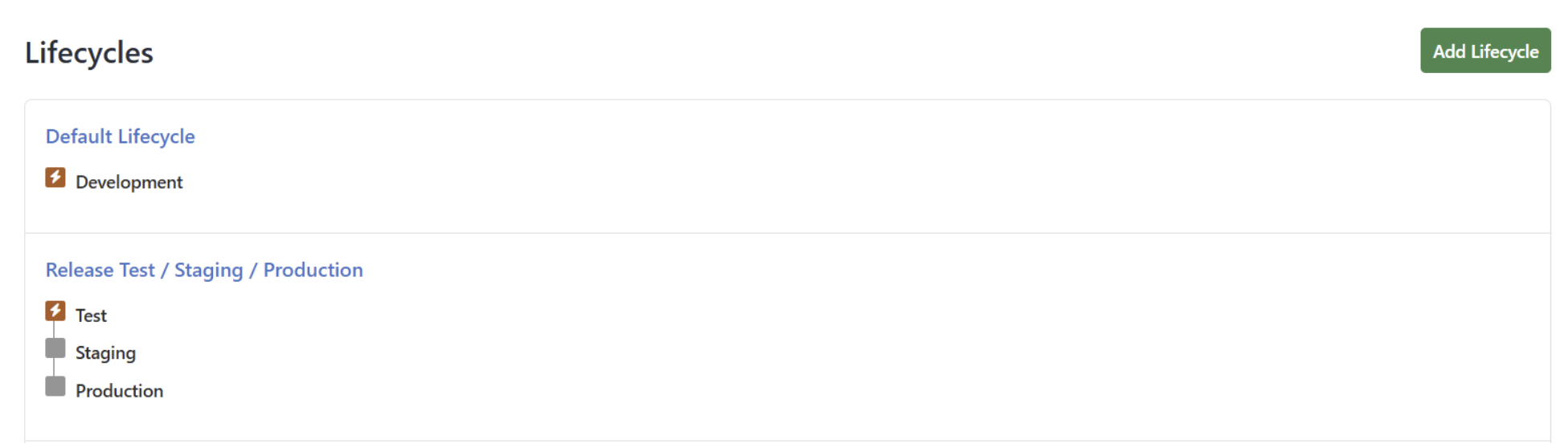
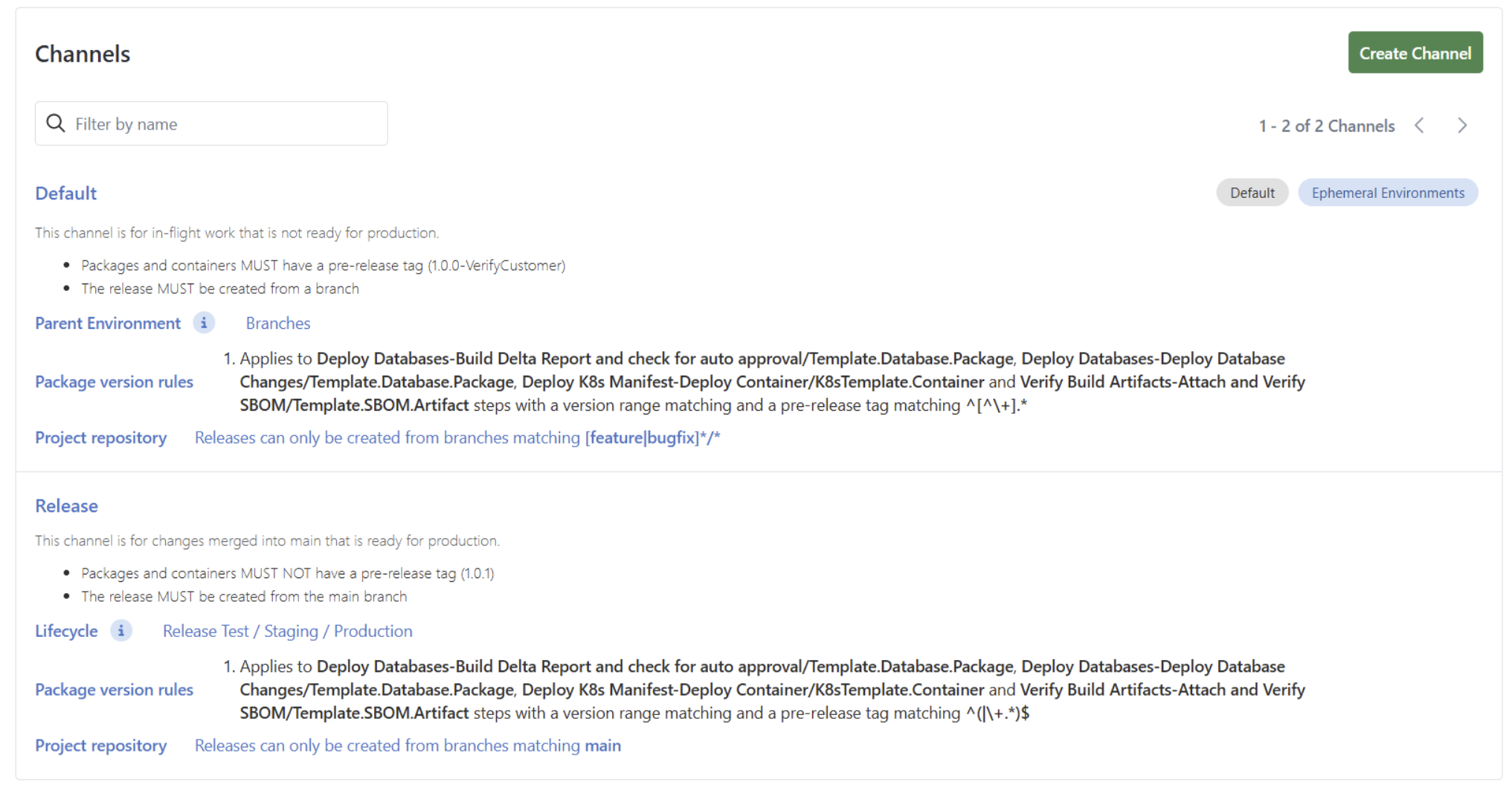
The subsequent channels are:
- Default: (uses the default lifecycle or an ephemeral environment): build artifacts require a pre-release tag.
- Release: (uses release lifecycle): build artifacts cannot have a pre-release tag and can only come from the main branch.
The screenshot below uses ephemeral environments instead of the default lifecycle. If the project cannot support ephemeral environments, then use the default lifecycle.
Running multiple versions in production
Some applications host multiple versions (v1.x, v2.x, v3.x, etc.) in production for backward compatibility. Deviation from the standard trunk-based development or GitHub flow is expected.
- The main branch represents the latest version (v3.x)
- Separate long-lived branches for earlier versions (v1.x and v2.x)
- Each version branch is treated like a “trunk”
- Changes are made in short-lived branches that were branched off the version branch.
- Merging into those version branches requires a pull request.
Create a single lifecycle:
- Release: test → staging → production
The project will have four channels:
- Default
- Uses an ephemeral environment
- Build artifacts require a pre-release tag and can only come from non-version or main branches.
- vCurrent
- Uses release lifecycle
- Build artifacts cannot have a pre-release tag
- Build artifacts must come from the main branch
- Build artifacts version must be <= 3.x
- V2
- Uses release lifecycle
- Build artifacts cannot have a pre-release tag
- Build artifacts must come from the v2 branch
- Build artifacts version must be between 2 and 2.999999
- V1
- Uses release lifecycle
- Build artifacts cannot have a pre-release tag
- Build artifacts must come from the v1 branch
- Build artifacts version must be between 1 and 1.999999
When ephemeral environments cannot be used then setup multiple static development environments.
To prevent retention policies for one channel from impacting deployments for another channel use the Discrete Channel Releases setting. Enabling this feature will also ensure that your project overview dashboard correctly shows which releases are current for each environment in each channel. Without this set, the default behavior is for releases across channels to supersede each other (for example, in a scenario where the 3 is expected to override the 3 release, allowing 3 to be considered for retention policy cleanup).
Other considerations
The above section describes common branching strategies and how to configure lifecycles and Channels in Octopus. However, depending on your release process, there may be other things to consider. Below are some questions that often come up in relation to branching and Octopus.
Different deployment process per branch
Sometimes a new feature introduces a new component requiring a change to the deployment process. All projects should use project config-as-code feature. That stores the deployment process, runbooks, variables, and deployment settings in a git repo.
- Make all the necessary changes to the deployment process, variables, and runbooks in a branch.
- Create test releases and deploy them to an ephemeral environment or static development environment.
- Merge those changes into the main or primary branch via a pull request.
Store the Octopus Deploy configuration in the same repository as the source code. Often a change to the deployment process has a corresponding code change. By using project config-as-code, both code and deployment changes are made in a branch and merged in the same pull request.
Hotfix lifecycles
Hotfix lifecycles are often created to skip lower environments (development and test) and deploy straight to upper environments (staging and production). Often they are created because there is one lifecycle development → test → staging → production.
Do not create hotfix lifecycles. That only causes more problems.
- Branching and Deploying
- Will the hotfix branch use an ephemeral environment for testing before going to staging?
- What will the version number be for the hotfix release? If production is 2026.8.1, does that mean the hotfix is 2026.8.1-Hotfix, 2026.8.1.1, or 2026.8.1.1-hotfix?
- The main branch is supposed to represent production. How will the appropriate hotfix be communicated to the rest of the engineering team?
- When will the hotfix changes merge into the main branch? How much of a delta is there between what is in the main branch and production? Can the fix even be merged into the main branch without serious modifications?
- testing and Risk
- What is preventing the main branch from being deployed to production?
- Were there changes already in staging that were overwritten by the hotfix? Will that impact other teams or applications?
- What steps and tests are being skipped in the test environment?
- How much time is really being saved by skipping the test environment?
- What if the hotfix requires a hotfix? How long is it acceptable to block the normal pipeline from deploying to staging → production?
- How often is the hotfix pipeline tested and verified?
Instead, follow the recommendation from above and create two lifecycles:
- Default: development only
- Release: test → staging → production
The Default lifecycle represents pending work in short-lived branches. The Release lifecycle represents the main or primary branch.
Release branches
Some branching strategies recommend a long-lived release branch.
Do not use release branches unless multiple versions of the application must run in production. When that occurs, follow the recommendation below for running multiple versions in production. Otherwise, when main is always in a production deployable state, there is no need for release branches.
Environment branches
Some branching strategies opt for a branch per environment strategy.
Do not use the branch per environment strategy.
- The code that will eventually run in production may not match 100% the code run during testing.
- It’s easy for a merge to go wrong and result in different code than you expected running in production.
- Packages have to be rebuilt, and different dependencies might be used.
Full vs. partial releases
Often, applications have multiple components. For example, an application may have a web front-end, a API back-end, a database, and a backend service. It is unlikely every pull request into main will includes changes for all components.
There are three options when this happens.
- Create a channel for each possible combination of components. One channel for web front-end and API back-end, another channel for API back-end and database, another for the backend service and database. Scope appropriate steps to each channel.
- Create a project for each component and a orchestration project. The orchestration project skips component unchanged component projects.
- Have a single deployment process, but use script steps, output variables, and variable run conditions to skip unnecessary steps. The script steps run on the deployment targets and pre-check for version differences.
There are pros and cons with each approach. For example, a channel component allows for a single deployment process. With four components, that means 16 channels for all the possible component combinations. The build server will need extremely complex scripts to pick the right channel. A project eliminates the need for 16 channels, but introduces complexity when orchestrating each of the component’s projects. Permissions and approvals become more complex. Both of those approaches assume Octopus Deploy is the truth center for what is running in production. But the actual truth center are the application hosts themselves.
The recommended approach is a single deployment process using script steps, output variables and variable run conditions to skip unneeded steps. For example, have a step create a delta script for all the database changes. If no database changes are discovered then skip the database deployment step.